10 Must-Have Subnautica Mods That Transform Your Underwater Adventure
Key Takeaways
- Subnautica mods can make your survival journey smoother, prettier, and way more fun
- You can improve everything—from performance and building to creatures, UI, and exploration
- Modding Subnautica is beginner-friendly thanks to tools like QModManager
- This guide shares personal-tested mods that actually enhance gameplay (not break it)
Subnautica mods let you upgrade visuals, improve performance, expand exploration, and make survival easier or more exciting. With tools like QModManager, installing mods is simple, and the right selection can completely transform your underwater adventure—without losing the game’s original charm.
Introduction: My Life as a Lost Survivor in the Ocean
If you’ve ever played Subnautica, you know the ocean doesn’t play around. The first time I crashed on Planet 4546B, I was so clueless that I built my base in a spot where Stalkers stole every metal scrap I found. Good times.
But once I discovered mods? Oh man—my underwater life changed forever.
From smoother swimming to cleaner building and even prettier water (yes, the water can look even better), these mods turned my chaotic survival trip into something I could brag about… instead of cry about.
Below, I’m sharing the top 10 Subnautica mods that genuinely improved my gameplay. No fluff—just the good stuff.
Top 10 Subnautica Mods You Need to Try
1. QModManager
The Must-Have Foundation
Before you do anything, grab QModManager.
Think of it like the oxygen tank of the modding world—you simply cannot survive without it.
Why you need it:
- Makes installing mods super simple
- Keeps everything organized
- Reduces crashes and headaches
Without it, your mods won’t even load, so start here.
2. Graphics Enhancer Mod Pack

Because the Ocean Should Look Stunning
I still remember the moment I installed better lighting and water shaders… I spent 10 minutes literally staring at the water instead of playing. Worth it.
What it improves:
- Water clarity
- Lighting colors
- Environmental shadows
- Overall immersion
| Feature | Vanilla | With Mod |
|---|---|---|
| Water Detail | Medium | Ultra clear |
| Shadows | Soft | Dynamic |
| Colors | Good | Gorgeous |
This pack makes Subnautica feel like a remastered edition.
3. EasyCraft
Crafting Without the Chores
If you’re tired of running back and forth between chests like you’re doing cardio in a survival game, EasyCraft will save your sanity.
Why it’s amazing:
- Auto-pulls materials from nearby storage
- Saves time (and your legs)
- Lets you focus on exploring, not fetching
I still don’t understand how this isn’t an official game feature.
4. MoreQuickSlots
Because 5 Quick Slots Are Not Enough
Ever tried switching tools while a Reaper Leviathan is screaming behind you? Yeah… not fun.
This mod gives you more quick slots so you can swap tools faster during intense moments.
Things get easier with:
- More tools available instantly
- Less panic scrolling
- Better quick reactions underwater
5. Map Mod
Finding Your Way Doesn’t Have to Be a Nightmare
Also Read This Article On 7 Powerful Reasons No Man’s Sky on Switch Is Better Than You Expect
Subnautica’s lack of a map was a cool idea… until I got lost for the 14th time.
This mod adds a real map that fills in as you explore.
Why it helps:
- Shows explored areas
- Tracks beacons
- Removes the “Where am I?” panic
It’s like finally getting GPS for your ocean life.
6. BaseSnap
Cleaner, Straighter, Prettier Building
If you’re like me and can’t place a corridor straight to save your life, BaseSnap is your hero.
What it fixes:
- Crooked builds
- Awkward floating objects
- Misaligned rooms
Your base will look like a real architect built it—not a panicked survivor in a hurry.
7. Upgraded Vehicles
Because Going Fast Underwater Is Fun
There are multiple vehicle mods, but the best ones allow upgrades like:
- More storage
- Better battery efficiency
- Increased speed
- Stronger hull
The Seamoth becomes a tiny submarine rocket. You’ll love it.
8. Resource Map
Stop Searching Blindly
This mod shows where important resources spawn. I felt like a treasure hunter with a cheat sheet.
It helps especially with:
- Lithium
- Magnetite
- Diamonds
- Kyanite
No more wandering aimlessly for hours.
9. De-Extinction
Adds New Creatures to the World
If you want your ocean to feel alive, this mod adds more species (and some extinct ones).
Why it’s fun:
- New wildlife interactions
- More variety in biomes
- Makes exploration exciting again
Though… try not to scream the first time one surprises you.
10. Vibrant Biomes
Brings Color Back to the Ocean
Some biomes in Subnautica feel a little… empty.
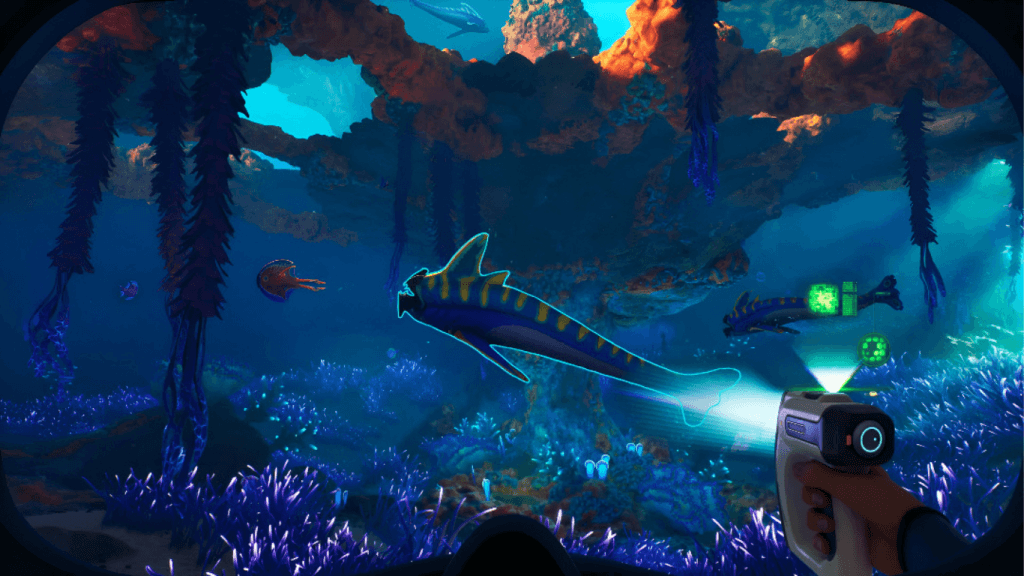
This mod boosts colors, adds new textures, and makes everything pop.
Expect:
- Brighter corals
- Richer kelp forests
- Gorgeous deep-sea glows
It turns the whole planet into wallpaper-worthy views.
How to Install Subnautica Mods (Quick Guide)
Also Read This Article On 7 Jaw-Dropping Reasons The Eternal Cylinder Is One of the Most Unique Survival Games Ever
Step-by-Step
- Install QModManager
- Download your chosen mods
- Drop them into the QMods folder
- Launch the game
- Enjoy your upgraded world
| Step | Action | Difficulty |
|---|---|---|
| 1 | Install QModManager | Easy |
| 2 | Download mods | Easy |
| 3 | Copy to QMods | Easy |
| 4 | Launch game | Super easy |
Even if you’ve never modded a game before, this process is beginner-friendly.
Summary
Subnautica mods can completely transform your underwater adventure—from visuals and performance to crafting and exploration. Whether you want better tools, smoother building, or a more stunning ocean, modding opens up a whole new world. With the right setup, you can enjoy a smoother, richer, more exciting version of Subnautica without losing the core survival charm that makes the game unforgettable.
FAQs
Yes, as long as you download them from trusted sites like NexusMods.
No, Subnautica still allows achievements with mods.
Rarely, but always back up your saves before installing big mods.
Absolutely—QModManager makes it simple.
Some do, but many require different versions.